 amberline
Pro vs Business: Which Amberline Plan Is Right for Your Team?
Amberline has three plans: Free, Pro, and Business. The Free plan is genuinely useful for sole traders tracking a handful of certificates. But once you outgrow 3 certificates, you're choosing between Pro and Business.
Both give you unlimited certificates, the same traffic-light dashboard, and the same automatic reminders at 90, 30, 7, and 0 days before expiry. So what's the difference, and which one should you pick?
The short answer
Pro is for one person tracking their own certificates. Business is for teams where multiple people need to see, add, and manage the same set of certificates.
If you're the only person who needs to log in, Pro is all you need. If you have an office manager, a site supervisor, or a business partner who also needs access, you want Business.
What Pro gives you
Pro removes the 5-certificate limit on the Free plan. That's the headline feature. Everything else — the dashboard, the reminders, the traffic-light status indicators — works identically to Free, just without the cap.
Pro costs £12/mo or £99/yr (save ~30% with annual billing).
Pro is the right choice for:
- Sole traders tracking their own CSCS card, gas safe registration, insurance, and van MOT
- Freelance contractors keeping on top of their own certifications
- Landlords with a portfolio of properties and no admin staff
- Small business owners who handle compliance personally
The common thread: one person, one login, one dashboard.
What Business adds
Business includes everything in Pro, plus three features designed for teams:
1. Shared workspaces
This is the core Business feature. When you upgrade to Business, Amberline creates a workspace tied to your account. Every certificate you add lives in that workspace, and anyone you invite can see and manage all of them.
No more forwarding spreadsheets. No more "can you check if Mike's CSCS is still valid?" emails. Everyone sees the same dashboard, the same traffic-light statuses, and the same expiry dates — in real time.
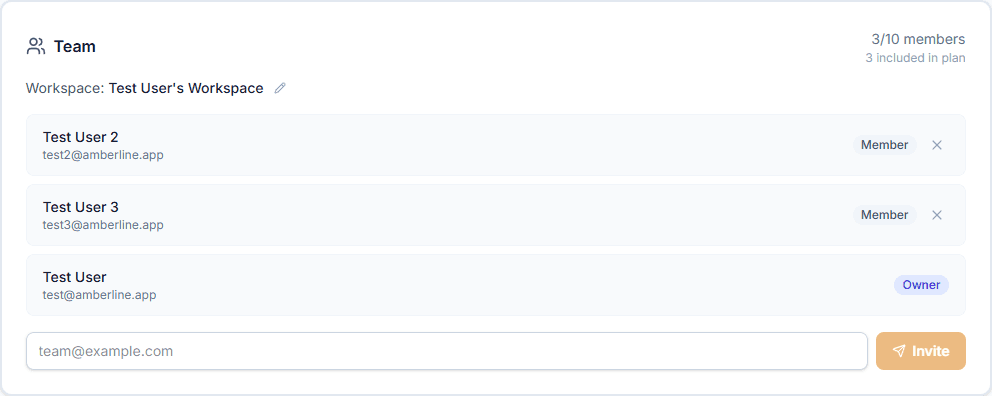
From Settings, the workspace owner can see all members, invite new ones by email, remove members, and rename the workspace.
2. Seat-based billing
Business includes 3 seats in the base price (the owner plus 2 team members). If you need more, additional seats are £5/mo each, added automatically when you invite beyond the included allocation.
The Settings page shows exactly how many seats you're using and how many are included in your plan — no billing surprises.
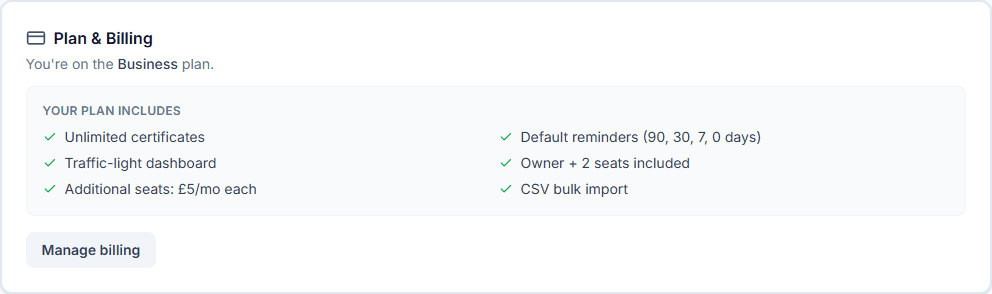
You're only charged for seats you use. Remove a member and the seat charge disappears from your next invoice.
3. CSV bulk import
Business plan users can upload a CSV file to add certificates in bulk. Instead of entering 50 certificates one by one, prepare a spreadsheet with name, holder, category, expiry date, and optional reference number, then import them all at once.
This is particularly useful during initial setup. If you're moving from a spreadsheet to Amberline, CSV import means you don't have to re-type everything.
Price comparison
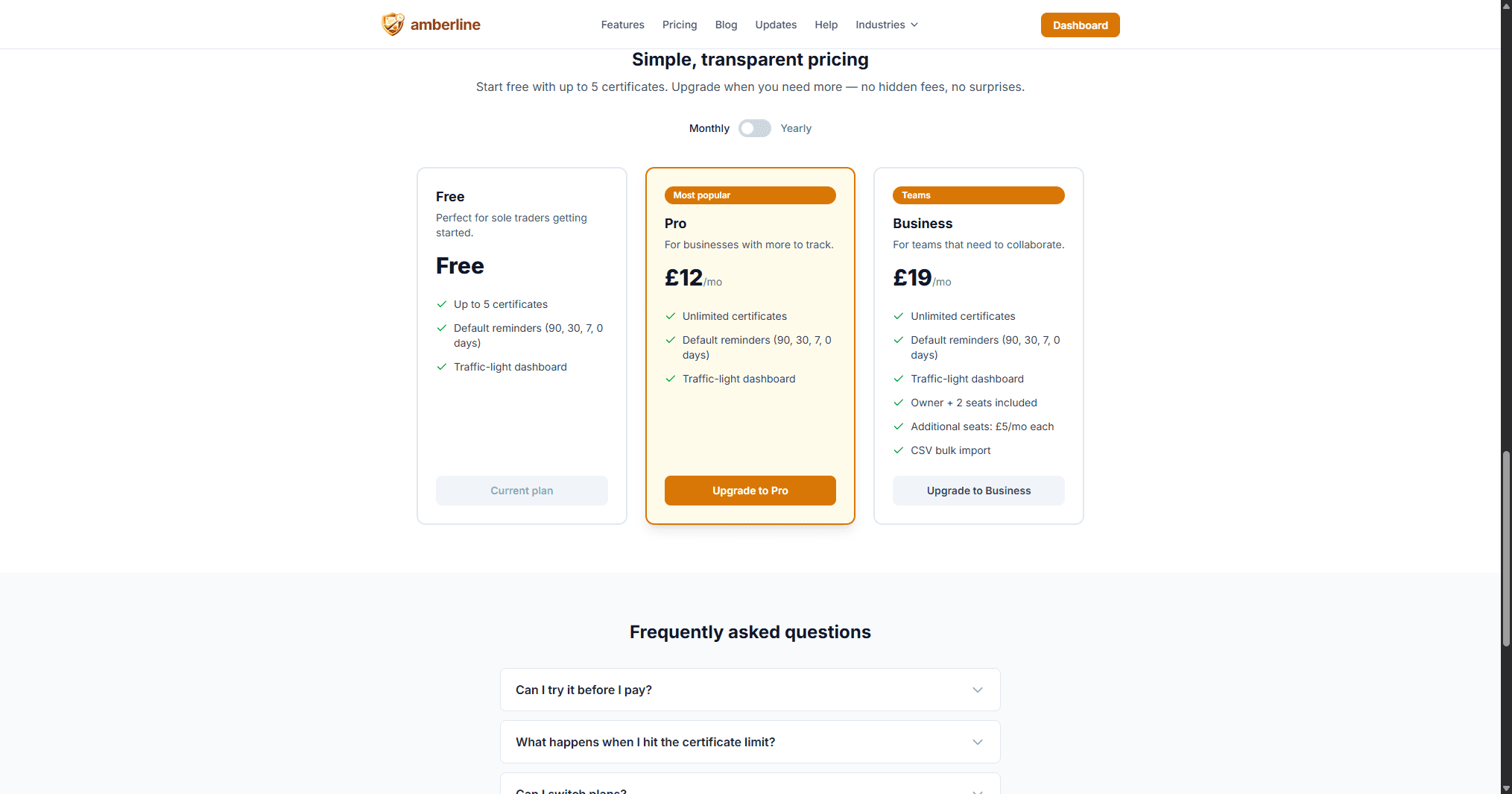
Here's how the plans stack up:
Pro — £12/mo or £99/yr
- Unlimited certificates
- Default reminders (90, 30, 7, 0 days)
- Traffic-light dashboard
- Single user only
Business — £19/mo or £149/yr
- Everything in Pro, plus:
- Owner + 2 seats included (up to 10 total)
- Additional seats: £5/mo each
- CSV bulk import
Who should choose Business?
Business makes sense as soon as more than one person needs to manage your certificates. Common scenarios:
- Construction firms where the office administrator and the site manager both need to check operative cards before mobilisation
- Landlord portfolios managed by a letting agent or property manager alongside the landlord
- Nurseries where the manager and the deputy both track DBS checks, first aid, and safeguarding certificates
- Growing trades businesses where the owner and an admin assistant split the compliance workload
The break-even point is simple: if you'd otherwise need two Pro accounts (£24/mo), Business at £19/mo with 3 seats is cheaper from day one.
How workspaces work in practice
Here's the typical setup:
- Owner upgrades to Business — this creates a workspace automatically
- Owner invites team members — enter their email in the Team section of Settings. They receive an email with a link to join
- Members accept and join — they create an account (or sign in if they already have one) and land in the shared workspace
- Everyone sees everything — certificates, holders, expiry dates, and reminders are shared across the workspace. Add a certificate from any account and it appears for everyone
The owner controls billing and team membership. Members can view, add, edit, and delete certificates but can't manage invites or billing.
If a member leaves (or is removed by the owner), their certificates remain in the workspace. No data is lost.
Switching plans
You can upgrade from Pro to Business at any time from Settings. Your existing certificates carry over into the new workspace — nothing is lost or duplicated.
If you downgrade from Business to Pro (or cancel), team members are removed and your certificates revert to a personal account. The workspace is preserved so re-upgrading restores the structure without starting from scratch.
All billing changes are prorated — you only pay for what you use.
Start with what you need
If you're not sure, start with Pro. You can always upgrade to Business later when the team grows. There's no penalty for switching, and your data moves with you.
Ready to stop tracking certificates in spreadsheets?
Start free with up to 3 certificates. No card required.
Get started free